
Everything worth keeping track of. No accounts.
Keep track of it all. Privately.
Medicines and when they were last taken. Money somebody still owes somebody. What’s nearly run out. Who has to be where on Thursday. What you lifted last week. What was said in that meeting. What’s left on a loan between friends. Seven things worth keeping an eye on, in one app — with no account to make, and nothing a server can read.
Free · works offline · installs like an app · nothing to sign up for.
What it’s for
The list in your head, somewhere safer
Running a home means keeping a running tally of small, boring, oddly important facts. Most of them end up in a notes app, a group chat, or nobody’s head at all — and the ones that don’t end up in some company’s database instead.
These are exactly the facts you would least like a stranger to hold: what your family takes, what you owe, when the house is empty. So The Mycelium is built so that nobody can hold them but you. There is no account to make. Everything is encrypted on your phone before it goes anywhere, and the server it syncs through is blind — it stores sealed blobs and has no key to open them.
-
Who has taken what, and when they can have more
Medication for yourself, a child, or a parent you look after — with the intervals and daily caps worked out rather than remembered.
-
Who owes whom, without the awkward maths
A trip, a share house, a couple. Log what was paid and the splitting takes care of itself.
-
What you are about to run out of
Feed, cereal, kibble, dishwasher tablets. A rough eyeball now and then is enough to know what to put on the list.
-
Where everyone has to be this week
One calendar the whole household can see, with the chores on it too, and reminders that arrive on time.
-
What you actually lifted, ran or held
Every set as it happened, so the totals and the personal bests are real rather than rounded.
-
What was said, without taking notes
Talk through a thought in the car or record a meeting, and get back a transcript and a summary you can read in a minute.
-
What’s left on a loan between friends
How much was lent, what was agreed, what has been paid and what is still owed — the same figures on both sides.
What’s inside
The seven things it keeps track of
Each module is a proper app in its own right, with its own screens and its own colour — they just share one install, one list and one recovery phrase. Whatever you keep in The Mycelium, the promise is the same: no account, and nothing a server can read.
-
 Next Dose Track medication doses for yourself or the people you care for.
 -
 Tally Stick Split shared expenses for trips, housemates or couples.
 -
 Stock Level Know how many days of anything you have left — feed, cereal, kibble.
 -
 Family Manager One shared calendar and to-do list for everyone at home, with reminders that arrive.
 -
 Rep Sheet Log workouts — treadmill, weights, plank, pilates — and watch them add up.
 -
 Voice Notes Record a thought or a meeting, then get a transcript and a summary — and keep the audio.
 -
 Loan Book Keep a straight record of a loan between family or friends: repayments, interest, and what’s still owed.
What it’s like to use
Seven kinds of thing, each still itself
-
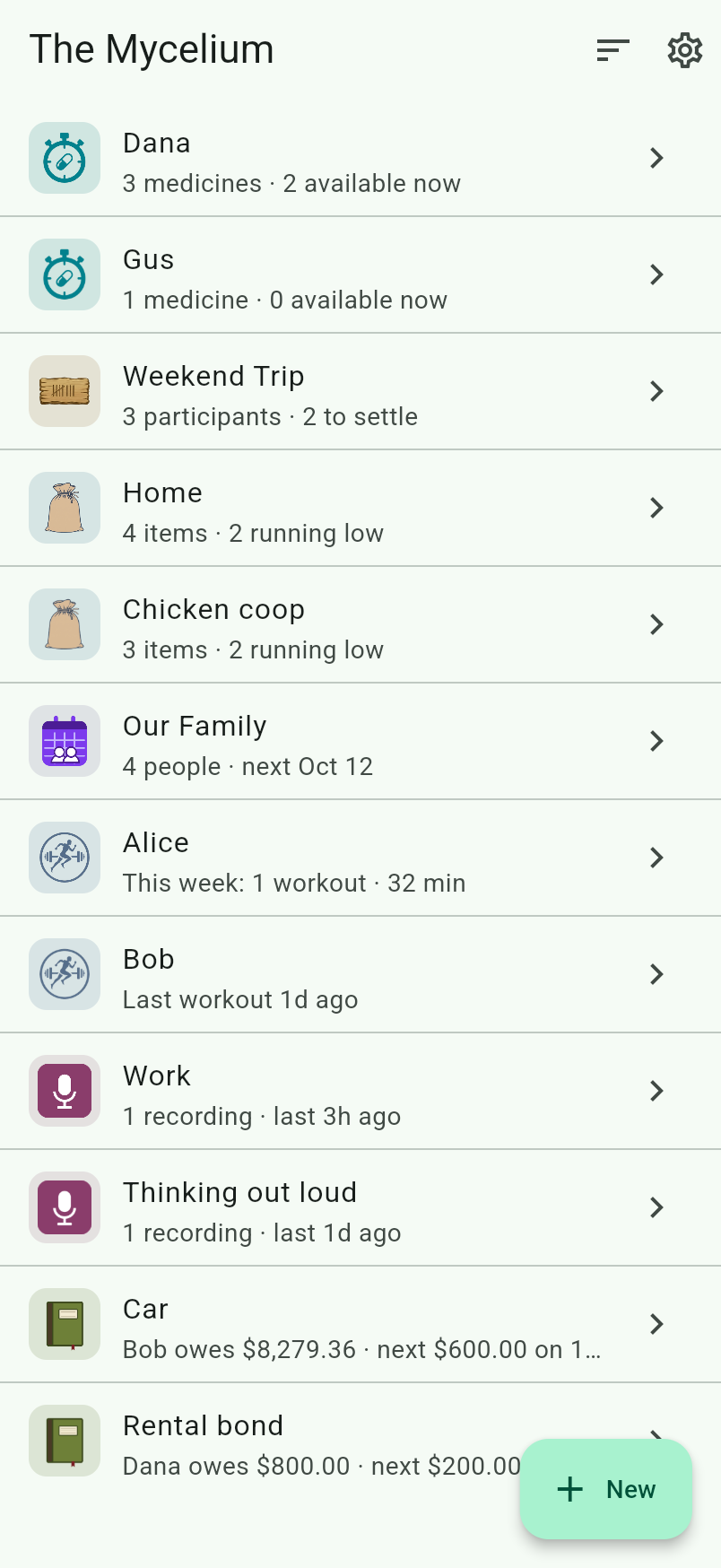
One list for everything
Medicines, expense groups, storerooms, your family’s week, your training, your notebooks and your loans all sit in the same list. Nothing to switch between, and nothing you half-remember setting up somewhere else.
-
Each one still feels like itself
Every row carries its module’s own icon and a line only it could write — “3 medicines · 2 available now”, not a generic count. Open one and the whole screen becomes its colour.
-
Ordered the way you think
Most recently used, grouped by kind, or plain alphabetical. Seven kinds of thing in one list is exactly where no single order suits everybody, so it’s yours to pick and it’s remembered.
-
“What kind?”, then straight in
Adding something asks what it is, then hands you the proper screen for it — the full thing, not a stripped-down version because it happens to share a list.
-
No account. Twenty-four words.
No email, no password, nothing to sign up for. A recovery phrase generated on your device is the whole identity, and the same phrase covers everything in the app.
-
Encrypted before it leaves your phone
Every space has its own key, held only by your devices. The server stores and forwards sealed blobs it cannot open — so “we don’t look at your data” is a fact about the design, not a promise in a policy.
-
Reminders that actually reach you
The calendar can wake your phone when something is due. The wake-up itself is empty — your device decrypts and writes the notification, because it is the only thing that can read it.
-
Every device, and offline
Scan a code or type the phrase and a new phone has everything. It installs like a normal app, works with no connection, and catches up the moment you’re back.
How it works
Encrypted, without accounts
- 1
One recovery phrase
On first use, The Mycelium generates a 24-word recovery phrase. Those words are your identity — there's no account, username, or password behind them.
- 2
The phrase unlocks your keystore
The phrase derives a master key that encrypts a small personal keystore — the list of shared spaces you belong to and the key for each.
- 3
Each shared space has its own key
A shared space has one group key. Everything in it is stored as documents encrypted with that key. Sharing the space means sharing that one key — via a QR code or invite — and the space's owners decide who's in. Remove someone and the key is rotated and re-shared to everyone who remains, so they see nothing new.
- 4
A blind server just relays ciphertext
Your devices sync through a server that stores and forwards encrypted blobs and pushes live updates. It never holds a key, so it cannot read anything it syncs.
Security
Even the sync server can’t read it
- One recovery phrase 24 BIP39 words derives your master key
- Master key encrypts your keystore the list of spaces you belong to
- Group key encrypts one space's documents every data, encrypted
Stores & relays encrypted blobs. Fans out live updates. Cannot decrypt anything.
Why it’s different
Private by design
-
End-to-end encrypted
Encryption and decryption happen only on your devices. Plaintext never leaves the device.
-
The server is blind
It's untrusted infrastructure by design: it stores and relays ciphertext and never holds a key. Compromising the server leaks nothing readable.
-
No accounts, nothing to breach
No email, no password, no profile. There's no user database to leak — just anonymous encrypted blobs keyed by hashes.
-
Self-host if you want to
The sync server is a single small binary you can run yourself. Point the app at your own URL and your ciphertext syncs through infrastructure you control.
-
Standard, modern crypto
libsodium primitives (XChaCha20-Poly1305, BLAKE2b) and BIP39 phrases. No custom cryptography.
-
Works offline
A PWA with a local encrypted cache — it works without a connection and syncs when it's back.
Used one of the standalone apps?
Nothing to migrate
Next Dose, Tally Stick, Stock Level, Family Manager and Rep Sheet used to install on their own as well. They don’t any more: everything now lives in The Mycelium. If you had one of them, install this, restore with the recovery phrase you already have, and everything you had appears.
There is no export and no import. Your recovery phrase has always held a single keystore covering every app; the standalone ones simply showed you their own part of it, and this shows you all of it. The old installs keep working against the same server until you delete them — they just won’t get updates.
Start using The Mycelium
No sign-up, no email, no password. Open it and go — your data is encrypted before it leaves your device.